

A nanny app is a specialized mobile platform that helps families find, book, and manage childcare providers by combining caregiver search, screening, communication, scheduling, and payment in one place. Think of it as the modern alternative to word-of-mouth referrals and agency phone calls. Platforms like Sittercity, UrbanSitter, and Daily Nanny have turned what used to be a weeks-long process into something you can manage from your phone during a lunch break. The core promise is simple: less guesswork, more confidence, and childcare that fits your actual life.
What is a nanny app and how does it work?
A nanny app is a mobile childcare platform that consolidates the hardest parts of hiring a caregiver, including search, vetting, communication, and payment, into a single workflow. Before these apps existed, parents juggled agency calls, paper applications, and reference checks across multiple channels. Now, the entire process lives in one interface.
The industry term you will see used interchangeably is “childcare app” or “caregiver matching platform.” Both refer to the same category of tool. What distinguishes a nanny app from a generic job board is the depth of childcare-specific features built directly into the experience.
Here is what the typical workflow looks like in practice. You create a family profile, describe your care needs, and either post a job or browse available caregivers in your area. You review profiles, check background reports, read parent reviews, and send a message directly through the app. From there, you schedule an interview, confirm a booking, and manage ongoing payments without ever leaving the platform.

What features do nanny apps typically offer?
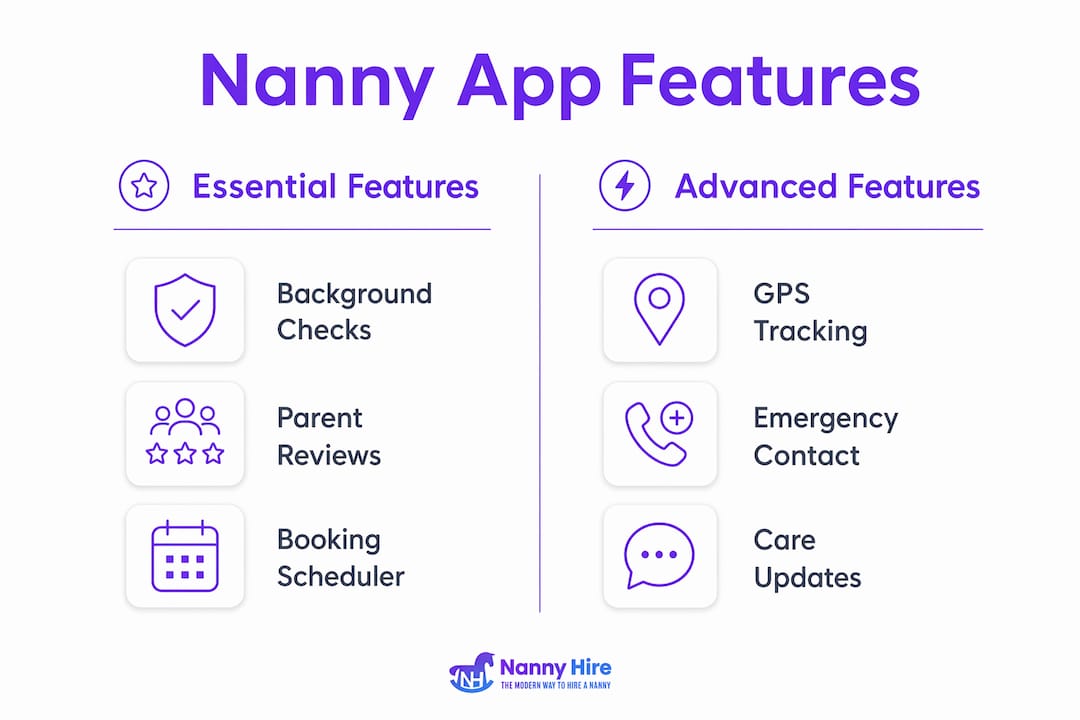
Nanny app features vary by platform, but the most useful apps share a core set of tools that cover every stage of the hiring process. Understanding what to look for helps you choose a platform that matches your specific situation rather than settling for the first one you download.
Core features found across most platforms:
-
Job posting and profile browsing: Sittercity lets families post jobs and filter applicants by skills, experience, and availability directly from a phone.
-
Background checks and trust signals: Most apps integrate criminal history checks, driving record verification, and employment history confirmation as part of the caregiver profile.
-
Direct messaging and interview scheduling: You can contact caregivers, ask questions, and set up interviews without exchanging personal contact details upfront.
-
Booking and payment processing: Confirmed bookings, shift tracking, and secure payments are handled inside the app, removing the awkwardness of cash transactions.
-
Care notes and activity sharing: Daily Nanny allows caregivers to log hours, share updates, and manage schedules in one place, keeping parents informed throughout the day.
-
Emergency and backup care: MomSub’s Premium plan guarantees backup caregivers when your regular nanny is unavailable, which is a feature most traditional agencies cannot match.
Pro Tip: Prioritize apps that show background check status, rehire statistics, and verified reviews directly on the caregiver profile. These three signals together give you a far more complete picture than any single data point alone.
Advanced platforms also offer GPS tracking during care sessions, emergency contact protocols, and the ability to share care notes between co-parents or guardians. These features matter most for families managing complex schedules or multiple caregivers.
How do nanny apps build trust and keep your family safe?
Trust is the single biggest concern parents have when hiring a caregiver, and nanny apps address it through layered safety mechanisms rather than relying on any one feature. The combination of verified identity, background screening, and community reviews creates a system where caregivers have strong incentives to maintain a clean record.
The table below compares how leading platforms approach safety and trust verification:
| Platform | Background checks | Identity verification | Parent reviews | Rehire stats |
|---|---|---|---|---|
| Sittercity | Criminal history, driving record | Yes | Yes | No |
| UrbanSitter | Annual background checks | Yes, required | Yes | Yes |
| Daily Nanny | Facilitated by platform | No | Yes | No |
| MomSub | Vetted before listing | Yes | Yes | No |
UrbanSitter requires that caregivers pass annual background checks and identity verification before appearing in search results, and families must also verify their own identity before booking. This two-sided verification model reduces the risk of fraudulent profiles on both ends of the transaction.
User reviews and ratings are equally critical. Reviews submitted by real parents comment on reliability, responsiveness, and how a caregiver actually interacts with children. These qualitative signals fill the gaps that a background check cannot cover, such as whether a caregiver shows up on time or communicates proactively.
Pro Tip: Never rely solely on the in-app background check. Call at least two references directly and ask specific questions about punctuality, communication, and how the caregiver handled an unexpected situation. Apps give you a strong starting point, but your own judgment closes the gap.
Background checks in nanny apps commonly include criminal history, driving records, and employment verification. The depth of the check varies by platform and whether you pay for an enhanced report, so always confirm what is included before treating a “background checked” badge as a complete clearance.
What are the best nanny apps and how do they compare?
The best nanny apps serve different needs, and the right choice depends on whether you need full-time care, occasional babysitting, or last-minute coverage. No single app dominates every category.
| App | Best for | Key differentiator | Pricing model |
|---|---|---|---|
| Sittercity | Full-time and part-time nannies | Deep filtering by skills and experience | Subscription-based |
| UrbanSitter | Last-minute and regular care | Speed of connection, rehire stats | Per-booking or subscription |
| Daily Nanny | Ongoing nanny management | Shift tracking, messaging, care notes | Free with premium options |
| MomSub | Schedule-specific matching | Algorithmic matching, virtual interviews | Subscription with premium tier |
MomSub stands out for families with non-standard schedules. The app matches families with vetted caregivers for specific schedules and offers virtual Zoom interviews, automatic payments, and schedule flexibility built directly into the platform. It also has a corporate partnership program, which means some employers offer MomSub access as an employee benefit.
UrbanSitter is the strongest option for urgent needs. The platform connects families with sitters within minutes in many cities, making it the most practical choice when your regular caregiver cancels with short notice.
Daily Nanny fills a different role entirely. It is less a hiring platform and more a management tool for families who already have a nanny and want a structured way to track hours, share updates, and handle payments. If you have already hired someone and need a way to manage the ongoing relationship, Daily Nanny is worth considering alongside your primary hiring app.
Geographic availability is a real limitation across all platforms. UrbanSitter and Sittercity have the broadest coverage in major U.S. cities, while MomSub and newer platforms may have limited caregiver pools in smaller markets. Always check local availability before committing to a subscription.
How to use a nanny app effectively to find the right caregiver
Getting the most out of a childcare app requires more than downloading it and browsing profiles. The parents who hire well use these platforms deliberately, with a clear process from start to finish.
-
Build a detailed family profile. Include your children’s ages, any special needs or routines, your preferred schedule, and what you value most in a caregiver. Vague profiles attract vague applicants.
-
Post a specific job listing. State your hours, location, pay range, and any non-negotiables such as driving ability, CPR certification, or experience with infants. Specific listings filter out poor fits before you spend time reviewing them.
-
Filter and evaluate profiles systematically. Sort by background check status, years of experience, and review count. Read the actual review text, not just the star rating. Look for patterns across multiple reviews rather than reacting to a single comment.
-
Use in-app messaging to screen before committing. Send a short message with two or three specific questions. How a caregiver responds, including their response time, tone, and the quality of their answers, tells you a great deal before you schedule a formal interview.
-
Schedule a virtual interview through the app. Platforms like MomSub support Zoom interviews directly within the workflow. Use this step to assess communication style, ask situational questions, and gauge how the caregiver talks about children.
-
Verify the background check independently. Confirm what the check covers and, if needed, order an enhanced report through a third-party service. Cross-reference with direct reference calls.
-
Manage ongoing care through the app. Use built-in scheduling, payment, and messaging tools to keep everything documented. This protects both you and your caregiver and makes it easy to track hours for tax purposes.
Pro Tip: When messaging a caregiver for the first time, describe a specific scenario relevant to your child, such as “My three-year-old has a meltdown at pickup time. How would you handle that?” Scenario-based questions reveal real experience far better than open-ended prompts like “Tell me about yourself.”
For last-minute care, UrbanSitter’s instant booking feature is the most reliable option currently available. Set up your profile and payment method in advance so you can act quickly when an emergency arises.
Key takeaways
A nanny app replaces fragmented search, vetting, and scheduling tasks with one platform, giving parents faster access to verified caregivers and ongoing management tools in a single workflow.
| Point | Details |
|---|---|
| Core definition | A nanny app combines caregiver search, background checks, messaging, booking, and payment in one mobile platform. |
| Trust mechanisms | The strongest apps layer background checks, identity verification, parent reviews, and rehire statistics together. |
| App selection | Choose based on your care type: UrbanSitter for speed, Sittercity for full-time hiring, Daily Nanny for ongoing management. |
| Effective use | Detailed profiles, scenario-based messaging, and independent reference checks produce better hires than passive browsing. |
| Safety best practice | Always verify what a background check covers and supplement it with direct reference calls outside the app. |
What I’ve learned after years of watching parents hire through apps
I built Nanny Hire because I was that parent refreshing three different apps at 11 p.m., trying to figure out whether a caregiver’s five-star rating was real or just their cousin leaving a review. What I have seen since then is that nanny apps genuinely work, but only when parents treat them as a starting point rather than a complete solution.
The biggest mistake I see is over-relying on the background check badge. A clean criminal record tells you someone has not been caught doing something illegal. It does not tell you whether they will show up on time, communicate when your child is upset, or handle a fever calmly. That information lives in references, in how they message you, and in a face-to-face or video conversation.
The second thing I would push back on is the idea that one app fits every family. I have watched parents spend weeks on a platform that was built for occasional babysitting when they needed a full-time nanny with infant experience. The platform was not wrong. It was just the wrong tool for their situation. Matching the app to your specific care type saves you real time.
What genuinely excites me about where these platforms are heading is the shift toward transparency. More apps are surfacing rehire statistics, verified references, and detailed availability data. That is the direction the whole category needs to move. The more information you have before a first conversation, the better your hiring decision will be.
Try two or three platforms before settling. The caregiver pool, the interface, and the quality of trust signals vary enough that a quick comparison is worth the extra hour.
— Chantel
Find your family’s perfect fit with Nanny Hire
Nanny Hire was built by a working mom who got tired of paying agency fees for a process that still felt like guesswork. The platform gives you transparent screening tools, three-perspective scoring, and a family-first approach that puts you in control from the first search to the final offer. You see verified profiles, reference checks, and scoring data before you ever send a message. When you are ready to stop browsing and start hiring with confidence, get started with Nanny Hire and find the caregiver your family actually needs.
FAQ
What is a nanny app used for?
A nanny app is a mobile platform that helps families find, screen, book, and manage childcare providers. It combines caregiver profiles, background checks, messaging, scheduling, and payment in one place.
Are nanny apps safe to use?
Reputable nanny apps like UrbanSitter require annual background checks and identity verification for both caregivers and families before a booking can be confirmed. Parents should also call references directly to supplement the in-app screening.
Can I find last-minute childcare through a nanny app?
Yes. UrbanSitter connects families with available sitters within minutes in many cities, making it a reliable option for urgent or same-day care needs.
How much do nanny apps cost?
Pricing models vary. Some platforms charge a per-booking fee, others offer monthly or annual subscriptions, and some like Daily Nanny offer a free tier with optional premium features. Check each app’s current pricing before committing.
What is the difference between a nanny app and a childcare agency?
A nanny app gives you direct access to caregiver profiles, reviews, and screening tools so you control the hiring process. A traditional agency acts as an intermediary, typically charges higher fees, and offers less transparency into how candidates are evaluated.